Skyvia Data Integration Failure Types Explained

Integration Failure Types in Skyvia Data Integration

Overview

When using Skyvia Data Integration, you may encounter two distinct types of integration failures:

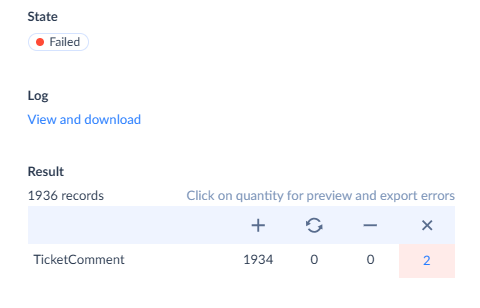
1. Record-Level Errors

These occur when one or more individual records fail to process during an integration task. For example, in operations like Synchronization and Replication, which rely on the LastSyncTime parameter, this can have specific implications.

The LastSyncTime parameter tracks changes since the last successful replication. During the initial execution, Skyvia sets this parameter to the current time, and subsequent runs only process changes made after that point. If some records fail, the LastSyncTime updates despite the failure. As a result, failed records are skipped in future runs until they are updated. Once updated, these records will be processed again in the next execution.
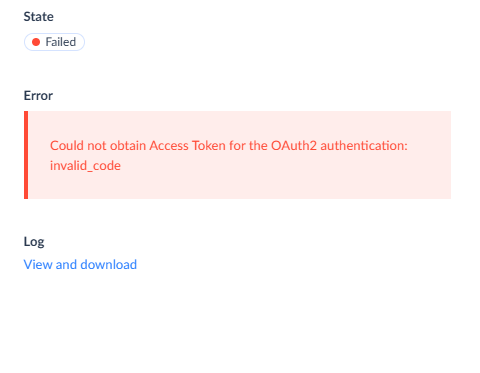
2. Integration-Level Errors

These occur when an error impacts the entire integration process, preventing it from completing successfully. In this case, no records are processed, and the LastSyncTime parameter remains unchanged. On the next successful run, no records will be skipped, and the integration will attempt to process all relevant data again.
Useful Links

    • Related Articles

    • Email Notifications for Integration Execution in Skyvia

      Overview Skyvia does not currently provide notifications for successful integration completion. However, you can configure email notifications to be alerted when an integration fails or when specific usage thresholds are reached. Notifications are ...
    • What is LastSyncTime in Skyvia?

      What is LastSyncTime? LastSyncTime is the point when Skyvia last successfully transferred data during a Replication or Synchronization. It helps Skyvia remember what data has already been delivered, so next time, only new or updated records are ...
    • Data Integration: You have reached the limit of records

      Overview The error "You have reached the limit of records" means your Skyvia account has consumed all records included in your current Data Integration plan for the billing period. No further records will be processed until the limit resets or you ...
    • Understanding Records in Skyvia Data Integration

      What Is a Record? A record in Skyvia Data Integration represents a single row in a database table or a single object in a cloud source (e.g., one contact in Salesforce, one row in a Google Sheet). Every integration operation - Import, Export, ...
    • Skyvia Query: Verify Data in Your Connection

      Overview Skyvia Query allows you to browse and verify data in any connected data source directly from the Skyvia interface, without writing complex scripts or using third-party tools. You can use the visual Builder view or write custom SQL ...